How ShareX itself goes cross-platform
ShareX is moving its operating system code behind one layer so the same application runs on Windows, macOS and Linux. The work is on the cross-platform branch of ShareX/ShareX and tracked in issue #8867. XerahS, a separate app started from scratch in December 2025, targets the same three platforms with a different design.
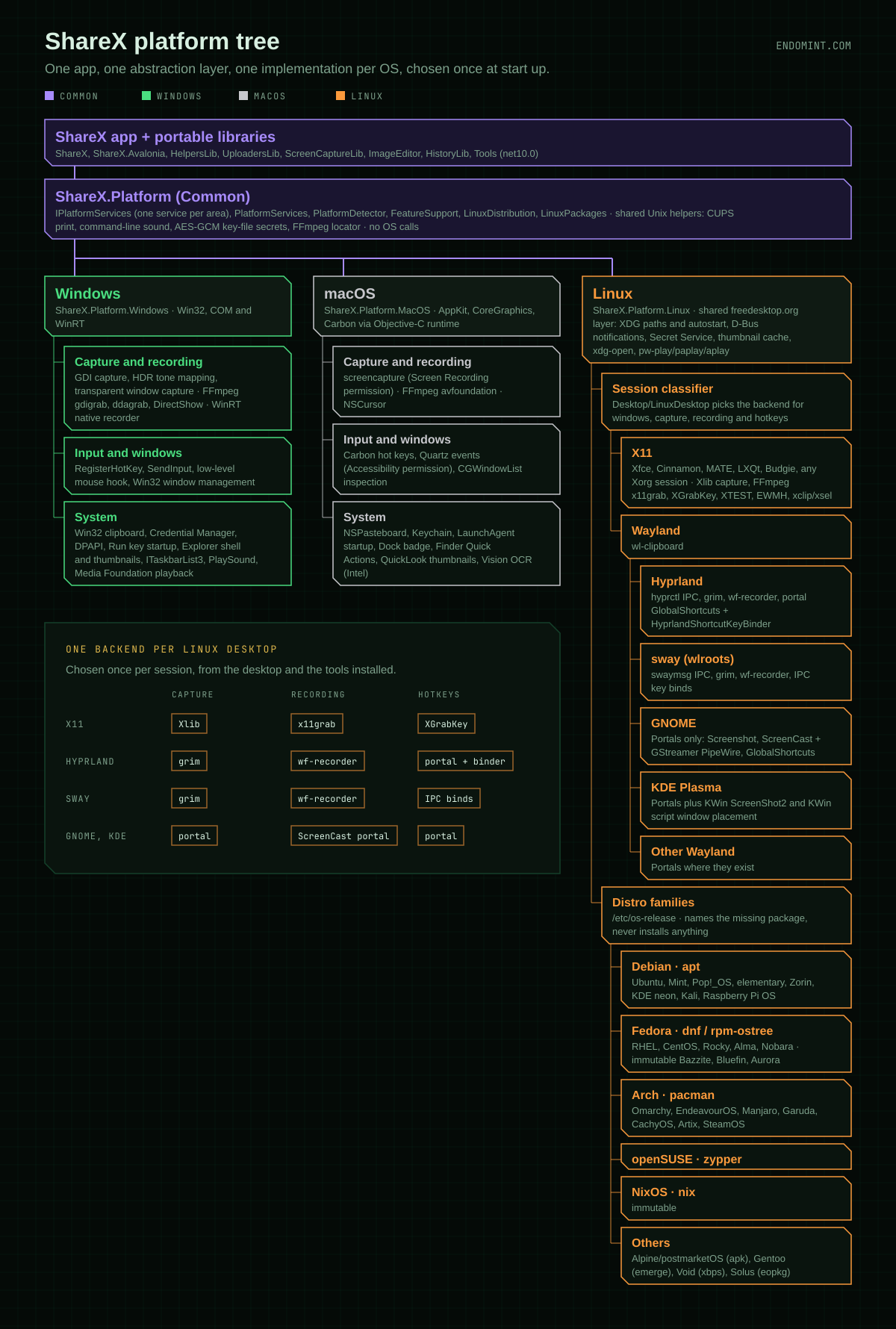
One check at start up
Program looks at the operating system once and hands PlatformServices.Initialize one of three implementations: Windows, macOS or Linux. That is the only operating system check in shared code. Everything after it asks PlatformServices.Current for a service.
The app and its libraries (ShareX, ShareX.Avalonia, HelpersLib, UploadersLib, ScreenCaptureLib, ImageEditor, HistoryLib, Tools) all target plain net10.0. Underneath them, ShareX.Platform holds the interfaces and makes no operating system calls. IPlatformServices has one service per area: paths, startup, clipboard, capture, recording, hotkeys, windows, input, notifications, shell, credentials, secrets, thumbnails, printing, sound, taskbar and system info.
Every service reports a FeatureSupport value. When something cannot work on the current system, the user gets a reason instead of a silent failure.
What each platform brings
Windows (ShareX.Platform.Windows) is Win32, COM and WinRT. It does GDI capture with HDR tone mapping and transparent window capture, records through FFmpeg (gdigrab, ddagrab, DirectShow) or a WinRT native recorder, and keeps Credential Manager, DPAPI, the Run key and Explorer's thumbnails. Its behaviour is meant to be identical to the code it replaces.
macOS (ShareX.Platform.MacOS) calls AppKit, CoreGraphics and Carbon through the Objective-C runtime. Capture goes through screencapture and needs Screen Recording permission, recording through FFmpeg's avfoundation, and input through Quartz events, which needs Accessibility permission. Secrets go to the Keychain, startup is a LaunchAgent, and Finder gets Quick Actions.
Linux picks once
Linux has a shared freedesktop.org layer that works on any desktop: XDG paths and autostart, D-Bus notifications, Secret Service, the thumbnail cache, xdg-open, and sound through pw-play, paplay or aplay.
The rest depends on the session, so Desktop/LinuxDesktop classifies it as X11, Hyprland, sway, GNOME, KDE or other Wayland, and each service asks it which backend to use.
| Desktop | Capture | Recording | Hotkeys |
|---|---|---|---|
| X11 | Xlib | FFmpeg x11grab | XGrabKey |
| Hyprland | grim | wf-recorder | portal, with keys bound by ShareX |
| sway | grim | wf-recorder | sway IPC binds |
| GNOME, KDE | Screenshot portal | ScreenCast portal and GStreamer | portal |
KDE gets one extra: the portal path first tries KWin's ScreenShot2 interface for captures that do not need a picker, and a KWin script places ShareX's own windows. GNOME, KDE and other Wayland desktops do not let ShareX list other windows, so window features there are reported as unsupported.
This is where it differs from XerahS. XerahS tries a list of capture methods in order until one returns an image. ShareX decides at the start of the session which backend fits, then uses it.
Hyprland needs the most care. Its GlobalShortcuts portal registers ShareX's hotkeys but does not assign keys, so ShareX binds them itself with hyprctl while it runs. Keys the configuration already uses, such as Omarchy's Print Screen, are left alone and shown as in use.
Naming the package, not installing it
PlatformDetector reads /etc/os-release and sorts the system into a family: Debian (apt), Fedora (dnf, or rpm-ostree on immutable variants such as Bazzite, Bluefin and Aurora), Arch (pacman, which covers Omarchy, EndeavourOS, Manjaro, CachyOS and SteamOS), openSUSE (zypper), NixOS, and Alpine, Gentoo, Void and Solus.
Users see the family when a feature needs a program that is missing: the reason names that distribution's package. It never runs an install and never shows an install command. Installing optional programs is left to the user.
Shipping it
Linux gets Scripts/install-linux.sh, which installs a self-contained build to ~/.local without root, or packs a .tar.gz with its own install.sh. Flatpak is deferred, because its sandbox blocks the compositor IPC, X11 window access and grim that capture relies on. XerahS ships a Flatpak and goes through the portal there, which is one of the trade-offs between the two designs.
macOS gets a .zip and a .dmg per architecture, signed with a Developer ID and notarised for a release.
The architecture is described in docs/cross-platform.md on the branch, with the roadmap beside it.