How XerahS runs on three platforms
XerahS is a screenshot, screen recording and upload app for Windows, macOS and Linux. It is not a port of ShareX. It was started from scratch in December 2025 as a new design in Avalonia, looking to ShareX's code for reference in places. ShareX itself is going cross-platform separately, on its own branch and with a different design. XerahS's layout is one shared core, one platform project per operating system, and a Linux branch that keeps splitting.
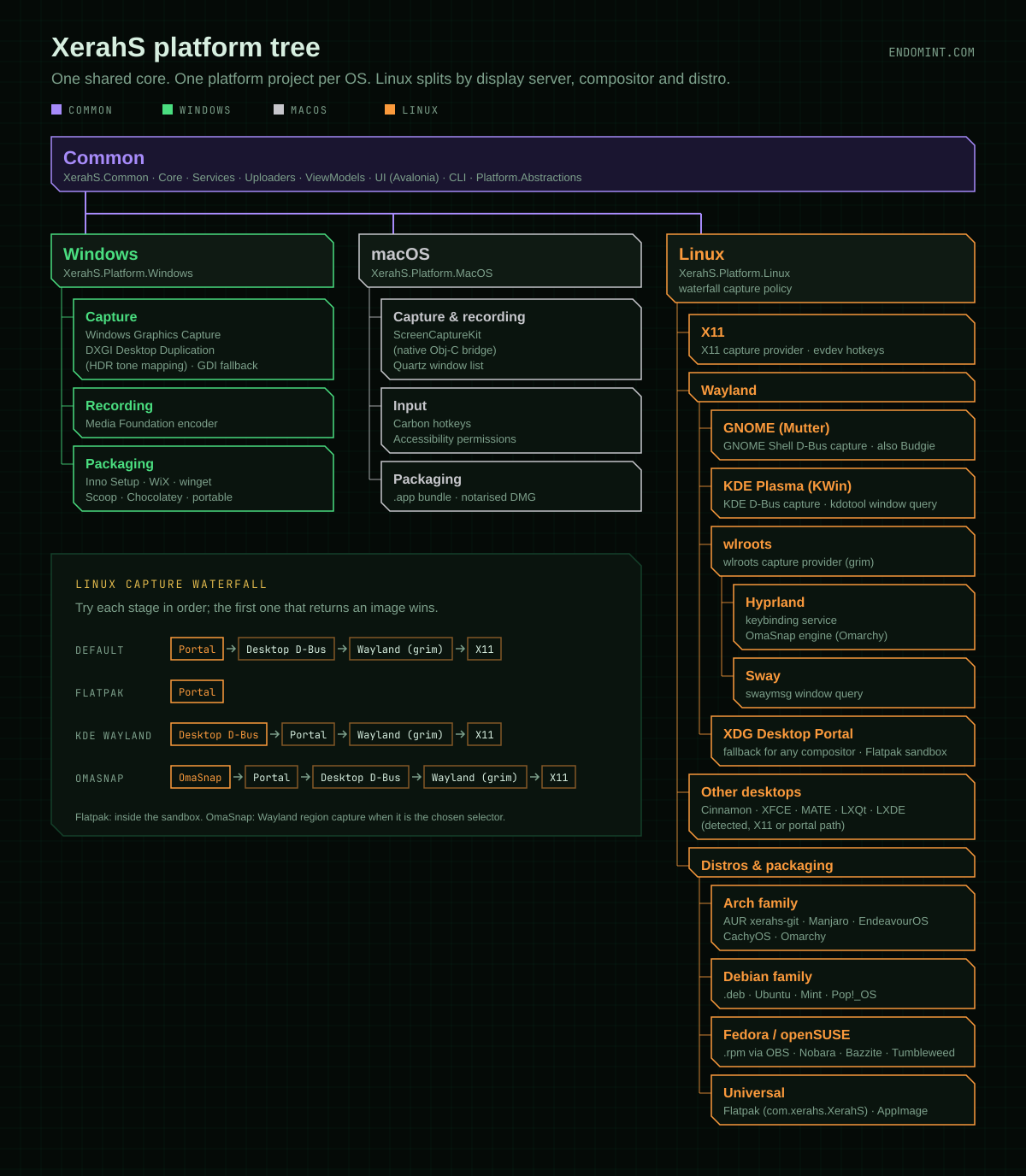
What lives in the shared core
Everything the app does, as opposed to how it reaches the operating system, sits in the Common trunk and is the same on every OS:
- XerahS.Common and Core, the task and workflow engine
- Services and Uploaders, so every upload destination is written once
- ViewModels and the Avalonia UI, so the editor and settings windows are the same windows everywhere
- the CLI, which runs the same jobs without a window
- Platform.Abstractions, the contract between the core and each OS
The last one does the work. It declares interfaces such as IScreenCaptureService, IClipboardService, IInputService and IWindowService. The core asks for those, and each platform project supplies its own implementation.
Windows and macOS stay short
Windows (XerahS.Platform.Windows) captures with Windows Graphics Capture, then DXGI Desktop Duplication, which also does HDR tone mapping, and falls back to GDI. Recording uses the Media Foundation encoder. It ships through Inno Setup, WiX, winget, Scoop, Chocolatey and a portable build.
macOS (XerahS.Platform.MacOS) captures and records with ScreenCaptureKit through a native Objective-C bridge, and reads the window list from Quartz. Hotkeys use Carbon and need Accessibility permission. It ships as an .app bundle in a notarised DMG.
Linux splits three ways
Linux has no single screenshot API. What works depends on the display server, the compositor, and how the app was installed, so XerahS.Platform.Linux is a tree of its own.
X11 is the simple case: an X11 capture provider, with evdev for global hotkeys.
Wayland does not let an app read the screen by itself, so each compositor family gets a path:
- GNOME (Mutter) through GNOME Shell's D-Bus capture, which Budgie also uses
- KDE Plasma (KWin) through KDE's D-Bus capture, with kdotool to query windows
- wlroots compositors through grim, with a keybinding service and the OmaSnap engine on Hyprland (as used on Omarchy) and
swaymsgwindow queries on Sway - XDG Desktop Portal as the fallback for any compositor, and the path inside a Flatpak sandbox
Cinnamon, XFCE, MATE, LXQt and LXDE are detected and go down the X11 or portal path.
The order Linux tries things in
None of those paths is fixed to a desktop. The Linux project runs a waterfall capture policy: a list of stages, tried in order until one returns an image. The order depends on where XerahS is running.
| Situation | Order tried |
|---|---|
| Default | Portal, desktop D-Bus, Wayland (grim), X11 |
| Inside Flatpak | Portal only |
| KDE on Wayland | desktop D-Bus, Portal, Wayland (grim), X11 |
| OmaSnap chosen for a Wayland region | OmaSnap, Portal, desktop D-Bus, Wayland (grim), X11 |
KDE puts its own D-Bus capture first because Plasma's portal dialog has no region option and KWin's interactive capture does. The portal stays behind it in case KWin refuses. OmaSnap leads only when it is picked as the region selector. If it fails, the rest of the Wayland order runs, and if you cancel, the capture stays cancelled.
Getting it onto the machine
The last Linux branch is packaging:
- Arch family:
xerahs-giton the AUR, covering Manjaro, EndeavourOS, CachyOS and Omarchy - Debian family: a
.debfor Ubuntu, Mint and Pop!_OS - Fedora and openSUSE:
.rpmbuilds through OBS, reaching Nobara, Bazzite and Tumbleweed - everything else: Flatpak (
com.xerahs.XerahS) and AppImage
The capture order comes from WaterfallCapturePolicy.cs in ShareX/XerahS. ShareX's own branch takes the other route on Linux: it decides at the start of the session which backend fits, rather than trying a list.